 StoryCodex
Hands-Free Listening for Web Serials
Commute, exercise, or do chores while your web novel reads itself aloud: lockscreen controls, Bluetooth buttons, sleep timers, and offline voices.
 ForgeAppsUpdated September 29, 20266 min read
Finding quiet hours to sit down with a 1,000-chapter web novel is tough for busy adults. Hands-free listening bridges the gap: three to five chapters a day during a commute, a gym session, dishes, or a dog walk adds up to finishing long serials on schedule. To make it seamless, your reader needs real audio controls that never ask you to stare at a screen, plus offline voices that keep playing when the signal drops. If you have not converted your serials yet, turn any web novel into an audiobook first, then come back for the setup below.
Essential hands-free audio controls
Lock Screen Controls
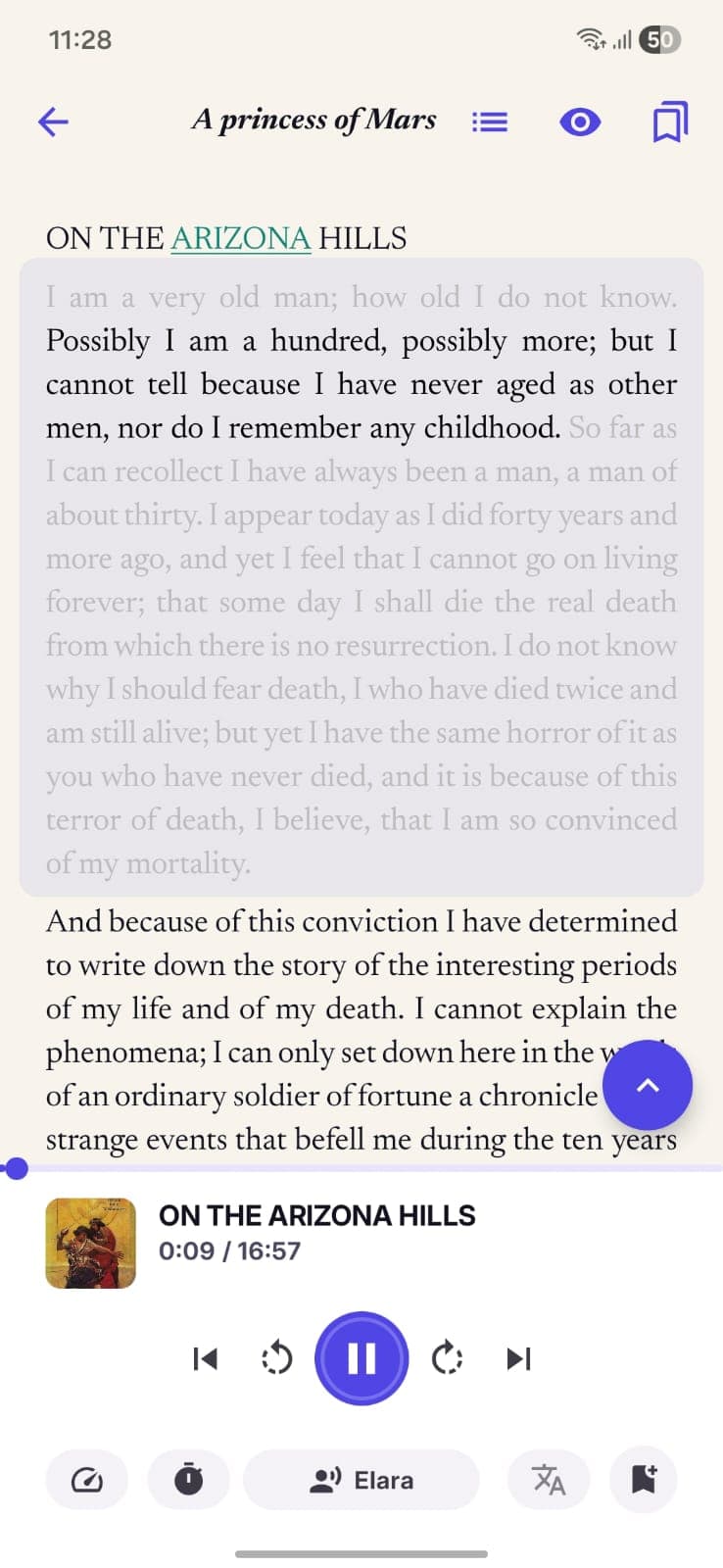
StoryCodex posts a standard media notification titled with the chapter you are hearing, with five buttons: Previous chapter, Skip back, Play or Pause, Skip forward, and Next chapter. The compact lock screen view keeps skip back, play, and skip forward visible, and everything works with the screen off because playback runs as a foreground service.
Sentence Skips Instead of Rewinds
The skip buttons move exactly one sentence backward or forward, not 15 or 30 seconds. When a single line gets lost under road noise or a gym playlist leak, one tap replays that line instead of dumping you half a scene back.
Bluetooth and Headset Buttons
Standard media buttons on wireless earbuds, car stereos, and speakers drive playback through the Android media session, including multi-click headset presses. If the app was killed in the background, a headset press can restart playback handling without opening the app.
Sleep Timer
Inside the 'Playback & Sleep' sheet you choose Off, End of chapter, or a fixed 5, 15, 30, or 60 minutes. While a timer runs, the full player shows a live 'Sleep in ~Nm' countdown. If 'Auto-play next chapter' is off, End of chapter is the default behavior anyway: narration stops cleanly at a chapter break instead of mid-scene.
Instant Resume
Your position is saved per sentence. Press play on a headset or open the app and narration continues from the exact line where you stopped, even across reading and listening sessions, so a chapter started on screen can finish in your ears.
Setting up your ideal commuting workflow
How to configure StoryCodex for hands-free listening
- 1
1. Pre-download your voice and chapters
Grab your neural voice over Wi-Fi before leaving home (Piper is 45 MB, Kokoro about 100 MB, Supertonic about 404 MB), and make sure the chapters you want are saved. For a longer trip, select a range in the chapter list and tap 'Audio' to bulk-generate offline audio ahead of time.
- 2
2. Set your default playback speed
The 'Narration speed' sheet offers presets from 0.75x to 2.0x, with 1.0x marked as Normal speed. Most commuters settle at 1.25x to 1.5x: fast enough to keep momentum, slow enough to stay comfortable for an hour.
- 3
3. Turn on Auto-play next chapter
Open the 'Playback & Sleep' sheet and enable 'Auto-play next chapter' so chapter transitions roll on without touching the phone. The lock screen and headset controls still let you jump chapters manually when you want to skip or repeat one.
- 4
4. Park the phone
Once narration is running, everything you need is on the lock screen, your earbuds, or your car's controls. The screen can stay off for the entire trip; playback runs as a foreground service and does not stop when the display sleeps.
In the car: what Android Auto does and does not do
StoryCodex exposes a real media session, so Android Auto picks it up like any other audio app. The car's browse view shows a single 'Continue reading' item that resumes whatever the reader was last narrating, and the head unit's transport buttons follow audiobook convention: previous and next move by chapter, rewind and fast-forward move by sentence. One thing to know: the car UI resumes an existing listening session rather than cold-starting a fresh book on its own. Start playback in the app while parked, pocket the phone, and let the session carry over. The same applies to a 'play StoryCodex' voice command, which resumes the current session rather than starting a new one.
When your attention drifts
Every hands-free listener knows the moment: the treadmill crowd noise swells, and suddenly a whole page went by unheard. The recovery tools are built for this. On the lock screen or notification, tap Skip back once per lost sentence. In scroll mode on screen, tapping the paragraph where you lost the thread sets a play anchor so narration picks up from that spot, and the seek bar in the full player scrubs the whole chapter if you need a bigger jump. Because position is saved per sentence, none of this ever costs you your place. If you have been away from a serial for weeks, a Previously On recap before the next session is a faster refresher than rewinding chapters, and the recap itself can be narrated aloud before the app rolls straight into the chapter.
Matching controls to the activity
Driving or riding in a car: start playback before moving, then use Android Auto or the car's media buttons for play and chapter skips; never tap the screen in traffic. Running or lifting: earbud buttons handle pause and resume, auto-play keeps chapters flowing, and a headset skip press replays a line mid-set without breaking form. Cooking or chores: the lock screen buttons are enough, since your hands are wet anyway. Bedtime: the sleep timer's End of chapter mode is the one setting that changes the habit, stopping narration at a clean break instead of mid-scene while you drift off.
One thing worth saying: neural voices keep pace, but your attention is the bottleneck. Dense political chapters and fast action scenes are easy to half-hear. Sentence-level skips and paragraph taps make recovery cheap, but for chapters where every sentence matters, reading on screen for a few paragraphs to re-anchor still beats any audio trick.
Hands-free commuter checklist
- Save your next batch of chapters offline before leaving home, or bulk-generate audio over Wi-Fi.
- Test your earbud play/pause and skip buttons once with the screen off.
- In the car, start playback in the app first; Android Auto resumes the session with 'Continue reading'.
- Set the sleep timer to 'End of chapter' when listening in bed.
- Keep speed between 1.0x and 1.5x for dialogue-heavy chapters.
- Use the one-sentence Skip back button when you lose focus for a moment.
Switching languages mid-story? The 'Narration language' chip in the player is available on the Supertonic engine, which covers 31 languages with auto-detect. Piper and Kokoro narrate in their own languages (English, and English plus Chinese respectively).
StoryCodex is free to try on Google Play and the App Store. Import a serial, pick a neural voice, and your library works fully offline, no account required.
Keep the story clear
Try StoryCodex for free.
Read, listen, and remember any long story with a private, spoiler-safe story memory that lives on your device.

