 StoryCodex
Turn Any Web Novel or EPUB into an Audiobook
Convert web serials, EPUBs, PDFs, and pasted text into offline audiobooks with neural voices. The full import-to-playlist workflow inside StoryCodex.
 ForgeAppsUpdated September 29, 20267 min read
Audiobooks are the fastest-growing format in digital publishing, but commercial catalogs have huge gaps. Most web novels, translated serials, indie fantasy ebooks, and fanfiction never get a professional narration. Even when they do, a 2,000-chapter cultivation epic spread across a dozen volumes costs serious money per year. The practical alternative is to generate the audiobook yourself, on your own phone, from text you already have. This guide walks through that whole pipeline in StoryCodex, from import to bulk audio generation, with the practical details that make it work well.
The conversion workflow
StoryCodex treats every book as audio-ready the moment it enters your library. Instead of relying on robotic legacy TTS or cloud streaming, the app packages three offline neural voice engines (Piper, Kokoro, and Supertonic) directly into the reader. The full conversion is: import the text, download a voice once, press play. Everything after that happens on device, which is why it works on a plane, in a tunnel, or on a metered connection.
Convert any text into an offline audiobook
- 1
1. Import from the Add Content sheet
Tap the add button on your library to open the 'Add Content' sheet. Under 'Save to your library', 'Add a Web Novel' saves a serial from its table-of-contents URL and 'Import Book' accepts EPUB files (you can select several volumes at once). Under 'Listen right away', 'Import Document' handles PDF or TXT, 'Narration from Text' lets you paste up to 50,000 characters for instant reading, and 'Listen to URL' reads a single article or chapter page without saving it. The import guide covers each source in detail.
- 2
2. Download a voice pack in Settings > Voice
Engines appear as tabs: Piper (English, 45 MB), Kokoro (English + Chinese, ~100 MB), and Supertonic (31 languages, ~404 MB). One download per engine unlocks all of its voices, and every voice has a preview sample you can play before committing. A System TTS tab also exists as a free fallback that uses whatever engine your phone already has, such as Google Speech Services, but it cannot generate offline audio files.
- 3
3. Test one chapter before committing
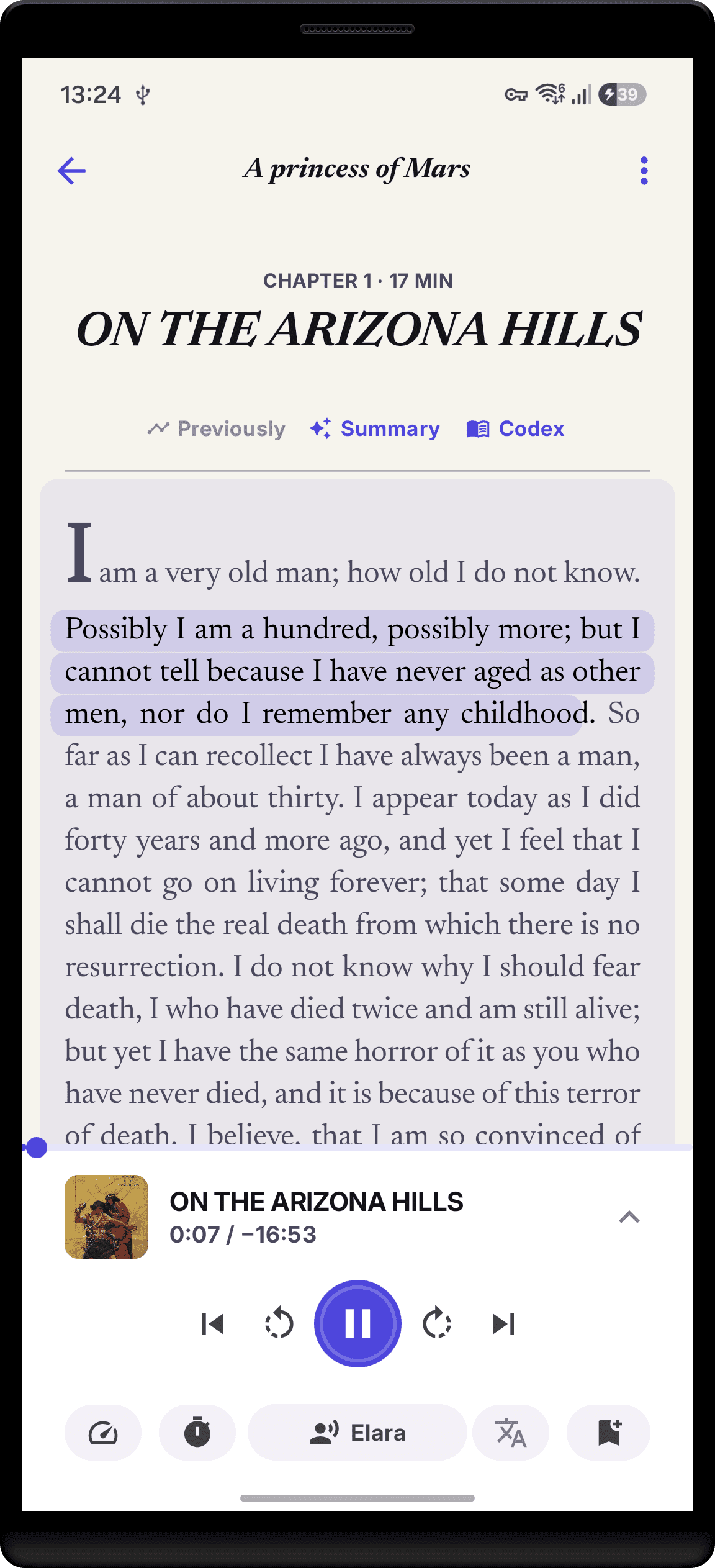
Open a chapter and press play. The reader highlights each sentence as it is spoken, and the 'Select Voice' sheet inside the player lists every voice on the active engine, so you can audition Piper's Aria against Kokoro's Vale on the same paragraph. Voice choice is app-wide rather than per-book, so the narrator you pick reads your whole library.
- 4
4. Tune speed and chapter flow
The 'Narration speed' sheet offers 0.75x, 1.0x (Normal speed), 1.25x, 1.5x, 1.75x, and 2.0x. In the 'Playback & Sleep' sheet, enable 'Auto-play next chapter' so the audiobook rolls straight through chapter breaks. Position is saved per sentence, so you can pause mid-word and resume exactly there.
- 5
5. Pre-generate audio in bulk (optional)
For true press-play-and-pocket listening, open the book's chapter list, enter 'Select Chapters', pick the range you want, and tap 'Audio'. A 'Bulk Generate Audio' sheet shows the chapter count and an estimated storage figure before anything runs. Generation then continues in the background under a 'Generating Bulk Audio' notification, and each finished chapter gets a headphones icon in the list. Bulk generation needs a neural engine; on System TTS the button shows a lock.
- 6
6. Keep reading and listening in sync
Because narration position and reading position are the same saved pointer, you can read a chapter on screen at lunch and continue it by ear on the drive home. Your queue of saved volumes simply plays through in order.
How much space a generated audiobook takes
Honest math, because generated audio is real audio. StoryCodex stores synthesized narration as raw audio at 24 kHz, which works out to roughly 5.5 MB per minute, or about 330 MB per hour. A typical web novel chapter that runs around 20 minutes lands near 115 MB; a 50-chapter arc is several gigabytes. That is why the bulk sheet shows a storage estimate up front. You manage it in Settings > Storage under 'Generated Audio', where you can clear everything or turn on 'Delete Generated Audio After Listening' so finished chapters clean themselves up. If storage is tight, skip bulk generation entirely: live playback synthesizes on the fly and caches only what you actually listen to, and the automatic cleanup option in Storage clears old audio files every 24 hours.
How close it gets to a real audiobook
Neural narration is not a human narrator. There is no actor choosing to whisper a reveal or growl a villain, and invented fantasy names occasionally land with approximate pronunciation. What you get instead is consistency across thousands of chapters, instant availability for books that will never be narrated, and full offline playback.
One thing that helps more than you would expect: before any text reaches the voice, StoryCodex runs a speech-safe cleanup pass. Decorative scene-break lines made of asterisks or dashes are muted instead of read aloud, image markers are skipped, and a line that is nothing but '?!?!?!' collapses instead of becoming a machine-gun of punctuation. ALL-CAPS words like 'DON'T' are spoken as words rather than spelled letter by letter, while genre acronyms stay as initialisms: HP, MP, EXP, DPS, and SS-rank come out the way a reader would say them. What still stumbles is structural, not cosmetic: LitRPG status boxes and stat tables read awkwardly as flat lists, onomatopoeia text varies by engine, and long proper-noun clusters in translated fiction can drift between chapters. For most web novel readers the trade is easy; for prose where every pause matters, nothing replaces a human performance.
Commercial Audiobooks vs. StoryCodex Neural Audio
| Feature | Commercial Audiobooks (Audible) | StoryCodex Neural Audio |
|---|---|---|
| Catalog Coverage | Mainstream titles only | Any web novel, EPUB, PDF, or TXT |
| Cost Structure | $15 to $30/mo subscriptions | Free and unlimited after voice download |
| Internet Requirement | Cloud streaming | 100% offline after voice download |
| Text Synchronization | Rare (Whispersync extra cost) | Exact sentence-level visual sync |
| Custom Narrators | Fixed narrator per book | Switch voices and languages anytime |
| Performance | Professional actor, directed | Consistent neural voice, no dramatic acting |
| Batch Pre-generation | Full download per title | Select chapters, tap Audio, runs in background |
Where this workflow shines
Three patterns cover most real use. Binge listeners select an entire serial's chapter list, bulk-generate on Wi-Fi overnight, and let 'Auto-play next chapter' run for hours. Commuters generate only the next arc, keeping storage to a few hundred megabytes. And readers returning from a break convert the backlog, then catch up after a hiatus at 1.5x while the Codex keeps every name straight. If you are still deciding what to pull in, the web novel reader overview explains how imports, the Codex, and narration fit together.
Questions listeners ask
Do I have to keep the app open while bulk audio generates?
No. Generation runs as a background task with its own 'Generating Bulk Audio' progress notification, and a completion notification tells you when the batch is done. It is fine to switch apps or lock the screen; leaving the phone plugged in on Wi-Fi is the comfortable way to do a large run.
Can I change voices or speed after generating chapters?
Speed is a playback setting and always adjustable. Voice is app-wide and also changeable anytime, but audio generated under one engine keeps that voice, so switch engines first if a series is mid-generation. You can delete saved audio in Settings > Storage and re-run the batch.
Will it read my language?
Piper covers English, Kokoro covers English and Chinese with 13 curated voices, and Supertonic covers 31 languages with an auto-detect option, which is the engine to pick for translated serials. System TTS reads whatever languages your phone's engine supports but cannot pre-generate audio.
Before you convert a whole series
- Test one chapter with two different voices before committing to a 500-chapter serial.
- Download voice packs on Wi-Fi: Piper is 45 MB, Kokoro about 100 MB, Supertonic about 404 MB.
- Check the storage estimate on the 'Bulk Generate Audio' sheet before a big run; audio averages roughly 330 MB per hour.
- Confirm the source text is clean: cluttered chapter pages produce cluttered narration.
- Keep EPUBs DRM-free; locked files cannot be imported or narrated.
- Enable 'Delete Generated Audio After Listening' in Settings > Storage if space is tight.
Enable 'Auto-play next chapter' in the 'Playback & Sleep' sheet so your generated audiobook plays continuously without touching the phone. Pair it with the sleep timer's 'End of chapter' mode for bedtime listening that stops cleanly at a chapter break.
StoryCodex is free to try on Google Play and the App Store. Import a serial, pick a neural voice, and your library works fully offline, no account required.
Keep the story clear
Try StoryCodex for free.
Read, listen, and remember any long story with a private, spoiler-safe story memory that lives on your device.

