 StoryCodex
Neural Narration Guide: Give Every Book a Voice
Piper, Kokoro, and Supertonic explained: how StoryCodex's three on-device neural voices differ, which to pick, and how to listen offline in 31 languages.
 ForgeAppsUpdated September 19, 20268 min read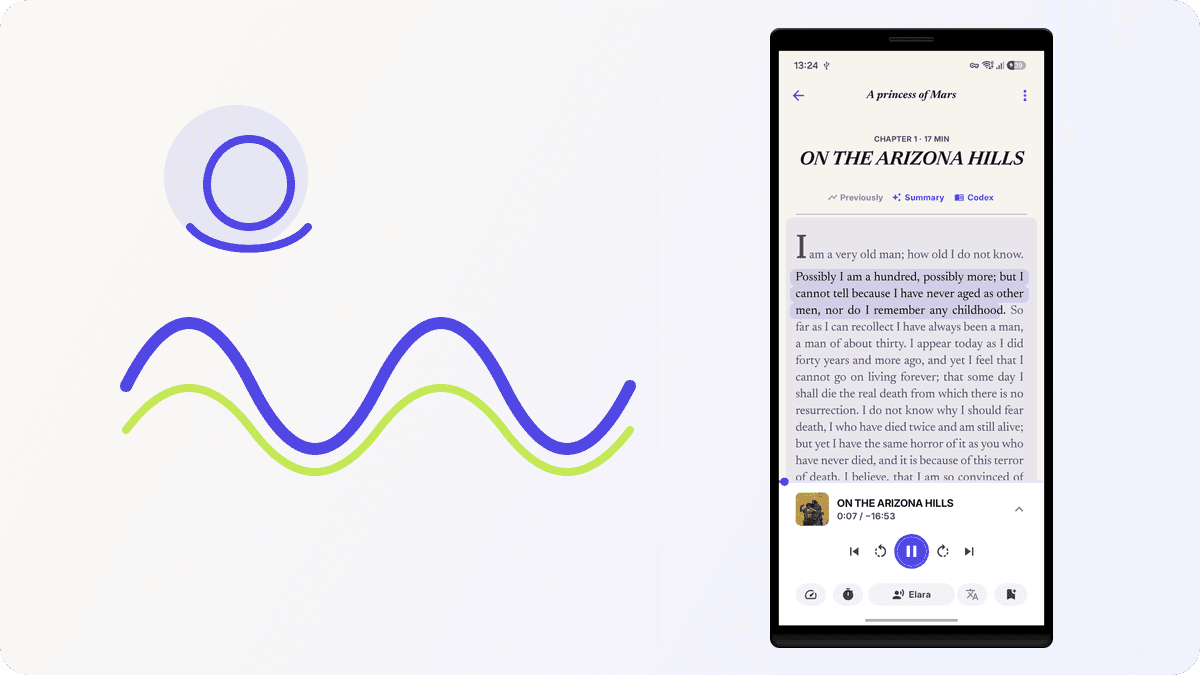
StoryCodex ships with three neural text to speech engines, and they are one of the reasons people stay: Piper, Kokoro, and Supertonic. Each is a different voice family with its own strengths, and you can switch engines between books, between chapters, or mid-sentence whenever the mood changes. All three run entirely on your device after a one-time voice download: no streaming, no account, no subscription. If you want the technical breakdown of models and licenses, the engine comparison covers it; this guide is about how the voices work, which to pick, and getting listening.
How a neural voice actually works on a phone
Every text-to-speech system solves the same two problems. First it has to decide what to say: which speech sounds, in which order, with what pitch, stress, and timing. Then it has to render that plan into an actual waveform your speaker can play. Older engines handled the first part with pronunciation dictionaries and hand-written rules, and the second part by gluing together short recordings of a human voice. Neural engines learn both halves from data, which is why the output carries cadence and natural breath instead of sounding assembled.
The three engines divide that work differently. Piper is a VITS model, an end-to-end network that maps phonemes directly to waveform; a compact rule-based component called espeak-ng converts written English into phonemes before the model sees them. Kokoro follows a similar phoneme-first shape but adds a style-conditioned model in the StyleTTS 2 family, plus a bundled US English lexicon for words espeak-ng would guess at. Supertonic goes furthest: its pack contains four separate int8 models, a text encoder, a duration predictor, a vector estimator, and a vocoder, and each utterance passes through an eight-step generation process before audio comes out.
All three packs ship in int8 form, and that single detail is what makes offline neural audio practical. Quantization stores each model weight as an 8-bit integer instead of a 32-bit floating point number, which shrinks the model roughly fourfold and lets it run at better than real-time speed on ordinary phone processors. The cost is a small amount of numeric precision, and in practice what you hear is the character of the model rather than the compression. This is also why the downloads are so modest: 79 to 141 MB buys you an entire voice engine, roughly the size of a two-minute video.
Underneath, all three engines run through sherpa-onnx on ONNX Runtime. StoryCodex picks an execution backend automatically: it prefers NNAPI, which lets Android route work to a GPU, NPU, or DSP where the device and engine support it, then an optimized CPU path called XNNPACK, then plain CPU as the universal fallback. If a backend fails or crashes during model load, the app quietly steps down to a safer one rather than breaking narration. None of this needs configuring; it is why the same pack runs on a budget phone and a flagship without drama.
The three engines
Piper
Ten English voices (Aria, Elara, Nadir, Victor, Lyria, Dorian, Felix, Milo, Leon, Elise) running on the lightweight Piper engine, originally built inside the Rhasspy voice project. The bundled model was trained on LibriTTS-R, a cleaned-up corpus of public-domain audiobook narration, which shows in how comfortably it handles long prose. Light, fast, and easy on battery, with prosody pauses at scene breaks. The default pick for long listening sessions.
Kokoro
Thirteen voices in English and Chinese (Maple, Sol, Vale, Lunar, Nova, River, Mist, Orion, Ash, Slate, Ridge, Jade, Onyx), based on the open-weight 82-million-parameter Kokoro model. Warmer and more expressive, the pick when tone and dialogue matter more than raw speed. Its ten Chinese voices are genuine Mandarin voices, not an English voice reading Pinyin.
Supertonic
Ten voices (Mira, Selene, Clara, Aurora, Vivian, Rowan, Elias, Magnus, Adrian, Lucian) across 31 languages, from Japanese and Korean to Arabic and Turkish, with automatic language detection per narrated segment. It also injects subtle nonverbal cues: a line like 'he laughed' before dialogue can produce an actual laugh, and sighs or breaths get the same treatment. The engine for multilingual libraries and translated fiction.
Choosing an engine
| Engine | Voices | Languages | Download size | Best for |
|---|---|---|---|---|
| Piper | 10 | English | ~79 MB (one pack) | Long sessions, fast reading |
| Kokoro | 13 | English, Chinese | ~141 MB (one pack) | Expressive narration |
| Supertonic | 10 | 31, with auto-detect | ~123 MB (one pack) | Multilingual libraries |
Choosing by what you actually read
Fiction puts unusual demands on a speech engine, and StoryCodex does some quiet work on your behalf. Before synthesis, the text passes through normalizers that turn things like Roman numerals and acronyms into speakable words, so 'Chapter IV' is read as a number rather than spelled out letter by letter. Invented names are still the hard part: the engine phonemizes them as written English, which produces a consistent approximation rather than a native pronunciation. Consistency matters more than perfection over a 1,500-chapter serial, because your ear learns the voice's version of the name.
Which one should you pick?
- Reading English web novels every day? Start with Piper and switch if you want more character.
- Reading translated fiction where mood matters? Kokoro voices carry tone better, and its Chinese voices handle original-language chapters.
- Library has several languages? Supertonic detects the language of each narrated segment automatically.
- Heavy dialogue with 'he sighed' and 'she laughed' everywhere? Supertonic's expression cues add real nonverbal sound.
- Listening at 1.5x or faster? Piper stays cleanest at high speed.
- Not sure? Preview a bundled voice sample in the voice picker before downloading anything, then compare engines on the same chapter.
The listening experience
Open the player and the full toolkit is there: narration speed presets from 0.75x to 2.0x, a sleep timer (off, end of chapter, or 5, 15, 30, or 60 minutes), auto-next-chapter, and voice switching on the fly. A compact player bar follows you through the app, and the full-screen Now Reading view works with lock screen controls, Bluetooth headset buttons, and Android Auto. The hands-free listening guide walks through commuting and workout setups.
The detail readers love most is sentence highlighting. As the narration speaks, the current sentence lights up in the text, so you can follow along and drop back in at any moment. Pause mid-chapter, tap a word, and the voice continues from exactly where you tapped. It is the same engine that lets you turn any web novel or EPUB into an audiobook, except the text stays on screen if you want it.
There is also a fourth option that needs no download at all: your phone's built-in system voice. It sounds more mechanical than the neural engines, but it works instantly, which makes it handy for a quick preview or for short pasted text while a voice pack downloads. Most readers try it once, hear the difference a neural model makes on the same paragraph, and never go back. If you are coming from a stock OS voice and want the full upgrade path, see replace robotic TTS with natural AI voices.
Storage, battery, and other practicalities
Voice packs live in app storage as a handful of files: the model itself, a token table or lexicon, and in Piper and Kokoro's case the espeak-ng data that handles phonemization. Removing a pack frees its full size and never touches your books, progress, or Story Codex data. You can also keep all three installed at once; the whole set costs under 350 MB, less than a single downloaded movie, and switching between them is instant.
Battery use is gentler than you might expect because synthesis is fast and the app works ahead of you. While a sentence plays, a background prefetcher synthesizes upcoming pieces and caches the audio to disk, so pausing and resuming replays finished audio instead of regenerating it. For long trips you can pre-render whole chapters ahead of time, which shifts the compute cost to a convenient moment; after that, playback is just ordinary audio decoding. The sleep timer and auto-next-chapter round out a setup that is comfortable leaving on a nightstand.
First-time voice setup
- 1
Download a voice
Pick an engine and voice in the reader or in settings. Each engine is a single download that unlocks all of its voices. Downloads happen over Wi-Fi by default, with a mobile data confirmation if you prefer to grab one on the go.
- 2
Press play
Start narration from the player bar or the full-screen player. Downloaded voices work immediately, offline, forever.
- 3
Swap any time
Change voice, engine, or speed mid-chapter without losing your place. Many readers keep Piper for daytime binge reading and switch to Kokoro for evening chapters.
Common questions about the voices
Does narration work on an older phone?
Generally yes. All three engines are int8-quantized and synthesize faster than real-time playback on mid-range hardware, and the app automatically falls back to a plain CPU path if hardware acceleration is unavailable or unstable.
Does listening at 2x degrade the voice?
No. Speed is a parameter passed to the model, not a fast-forward applied to finished audio, so pacing changes while pronunciation and tone stay intact. Very fast settings do compress the natural pauses, which is why dense prose feels better near 1.0x to 1.25x.
Is the voice setting per book or global?
Global. Engine, voice, speed, and language are app-wide settings, so your last choice follows you into the next book until you change it in the player.
Why does the voice say an invented name strangely?
The engine phonemizes names as ordinary English text, so unusual spellings get the nearest English reading. It will be wrong sometimes, but it is wrong the same way every time, which most readers find easy to adapt to.
Voice packs live in app storage, not your book library. Removing a pack to free space never touches your books, reading progress, or Story Codex data, and you can redownload it whenever you like.
StoryCodex is free to try on Google Play and the App Store. Import a serial, pick a neural voice, and your library works fully offline, no account required.
Keep the story clear
Try StoryCodex for free.
Read, listen, and remember any long story with a private, spoiler-safe story memory that lives on your device.

