 StoryCodex
Kokoro vs Piper vs Supertonic TTS Compared
Piper, Kokoro, or Supertonic? Verified facts, real download sizes, language coverage, and offline performance for the three neural engines in StoryCodex.
 ForgeAppsUpdated September 19, 20267 min read
Text-to-speech has moved fast. Old OS voices stitch together recorded snippets and sound like it; modern neural engines generate speech with deep learning models, producing real cadence, breath pauses, and emotional shading. StoryCodex builds three of the best open engines directly into the reader: Piper, Kokoro, and Supertonic. All three run through the same on-device runtime (sherpa-onnx on ONNX Runtime), all synthesize faster than real-time playback on a modern phone, and all work fully offline after a one-time download. They overlap in quality but differ in model origin, architecture, size, language coverage, and character. Here is the honest comparison, with the verified facts first.
The engines, side by side
| Feature | Piper TTS | Kokoro TTS | Supertonic TTS |
|---|---|---|---|
| Upstream model | vits-piper-en_US-libritts_r-medium | kokoro-int8-multi-lang-v1_1 | sherpa-onnx-supertonic-3-tts-int8 |
| Model origin | VITS-based engine from the Rhasspy project, now maintained by the Open Home Foundation | Open-weight 82M-parameter model by hexgrad, built on StyleTTS 2 lineage | On-device TTS system by Supertone; Supertonic 3 runs about 99M parameters |
| Architecture | Single end-to-end network: phonemes to waveform in one pass | Style-conditioned acoustic model plus bundled voices.bin speaker embeddings | Four-part pipeline: text encoder, duration predictor, vector estimator, vocoder, with an 8-step generation pass |
| License | GPL-3.0 (current repo); original MIT release archived | Apache-2.0 weights | MIT (upstream project) |
| In-app download | ~79 MB (one pack, 10 voices) | ~141 MB (one pack, 13 voices) | ~123 MB (one pack, 10 voices) |
| Languages in StoryCodex | English | English, Chinese | 31 languages with auto-detect |
| Text handling | espeak-ng phonemization, prosody pauses at scene breaks | espeak-ng phonemization plus a US English lexicon; script-aware chunking keeps CJK pieces short | Built-in unicode indexer; rule-based <laugh>, <sigh>, <breath> cues injected into prose |
| Audio character | Light, clean, efficient | Warm, expressive, dramatic | Versatile, multilingual |
| Best for | Daily binge listening and battery life | Character-driven fiction and tone | Translated and multilingual libraries |
| Honest weak spot | English only, and the least theatrical of the three | Largest download; curated voices cover English and Chinese only | No Chinese voice in the current catalog; auto-detect reads script, so Latin-alphabet languages need a manual pick |
Engine deep dives
Which engine should you choose?
Piper: the efficiency champion
Piper began inside Michael Hansen's Rhasspy offline voice-assistant project and is now maintained by the Open Home Foundation as piper1-gpl. The StoryCodex pack is a single VITS model trained on LibriTTS-R, a corpus of cleaned public-domain audiobook narration, which is part of why it reads long prose so evenly. Ten English voices (Aria, Elara, Nadir, Victor, Lyria, Dorian, Felix, Milo, Leon, Elise), the smallest download of the three, and the gentlest battery profile. Pick it for marathon sessions and playback at 1.5x to 2.0x.
Kokoro: warm emotional range
Kokoro is an open-weight model with 82 million parameters, Apache-2.0 licensed, and widely praised for quality that punches above its size. StoryCodex ships the int8 multilingual v1.1 build with 13 curated voices (Maple, Sol, Vale, Lunar, Nova, River, Mist, Orion, Ash, Slate, Ridge, Jade, Onyx): three English voices and ten genuine Chinese voices for original-language serials. Pick it when dialogue, tone, and dramatic prose matter more than download size.
Supertonic: the multilingual powerhouse
Supertonic is Supertone's on-device TTS system, designed for local inference on phones and even Raspberry Pi-class hardware with no GPU. Supertonic 3 covers 31 languages at roughly 99M parameters, packaged in StoryCodex as four int8 models. It drives 10 voices (Mira, Selene, Clara, Aurora, Vivian, Rowan, Elias, Magnus, Adrian, Lucian) with per-segment language auto-detection and subtle nonverbal cues for laughs, sighs, and breaths. Pick it for translated and multilingual fiction.
What all three share
Under the hood the differences shrink. All three packs are int8-quantized, which is why none of them exceeds 141 MB and why all of them synthesize faster than playback on a mid-range phone. All three run through sherpa-onnx, the same open-source runtime that packages the upstream models, and StoryCodex chooses an execution backend automatically: neural acceleration where the device offers it, then optimized CPU, then plain CPU. All three get the same pre-processing too: Roman numerals and acronyms are normalized into speakable words before synthesis, narration position is tracked per sentence, and generated audio is cached so pausing and resuming replays rather than regenerates. Choosing between them is really choosing a voice family and a language set, not a feature tier.
A simple decision flow
Pick your engine in three questions
- 1
Is everything you read in English?
Stay with Piper or Kokoro. Piper if you binge at high speed or care about storage and battery; Kokoro if you listen at normal speed and want the warmer, more dramatic read. Most English-only readers end up keeping both and swapping by mood.
- 2
Do you read original-language Chinese chapters?
Choose Kokoro. Its ten zf_ and zm_ voices speak actual Mandarin, which no amount of English or Japanese pronunciation can fake. Supertonic's catalog does not include a Chinese voice in this build.
- 3
Does your library span several other languages?
Choose Supertonic. Its 31-language catalog covers Japanese, Korean, Spanish, French, German, Russian, Arabic, Turkish, and more. Leave language on Auto for non-Latin scripts, and set it manually for Latin-alphabet languages like Spanish or French, which auto-detect cannot tell apart from English.
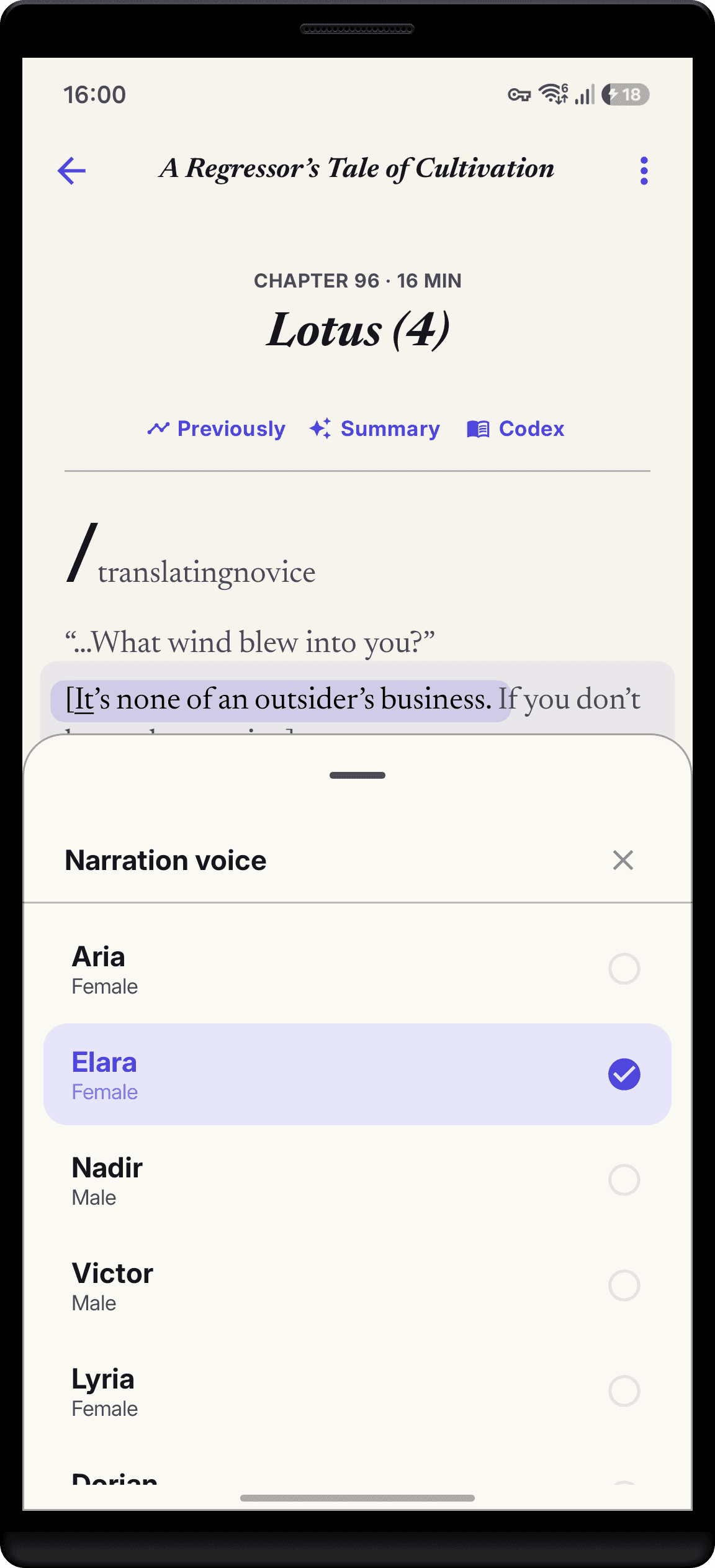
In practice the gap is narrower than spec sheets suggest. All three share the same player features: sentence highlighting, sleep timers, speed presets from 0.75x to 2.0x, lockscreen controls, and bulk chapter pre-rendering for trips. The real decision is language coverage versus character. English-only readers choosing on battery life lean Piper; readers who want the warmest narration lean Kokoro; anyone with a mixed-language library should default to Supertonic. The neural voice guide covers the day-to-day listening experience, and replacing robotic TTS explains why any of the three beats your phone's default voice.
Frequently asked technical questions
Do these voices require an internet connection?
No. Each engine downloads one model pack over Wi-Fi, then runs 100% offline on your device's processor. Nothing you read is sent anywhere.
Can I change voices mid-chapter?
Yes. Open the player voice selector to swap engines or voices instantly without losing your sentence position.
Are voice downloads free?
Yes. All three engines are open models, and voice downloads are included with StoryCodex at no extra cost.
Which engine uses the least storage?
Piper, at roughly 79 MB for its full 10-voice pack. Kokoro is about 141 MB and Supertonic about 123 MB. All three together cost under 350 MB, and you can delete a pack anytime without touching your library or reading progress.
Which engine should I use for Chinese web novels?
Kokoro. It ships ten genuine Mandarin voices. Supertonic's current catalog does not include Chinese, and in auto mode Chinese characters get routed to its Japanese path, which is not a substitute for Mandarin pronunciation.
Does auto-detect figure out Spanish or French automatically?
No. Supertonic's auto mode classifies by script, so it reliably spots Korean, Japanese, Arabic, Russian, Greek, Hindi, and Vietnamese text. Latin-alphabet languages all look alike to it and resolve to English, so set the language manually in the voice picker for those books.
Which engine is best at high playback speed?
Piper. Its light, even delivery stays clean at 1.5x to 2.0x, where the more expressive engines start compressing their natural pauses. For dense prose at normal speed, Kokoro's extra warmth is worth it.
Can I use different engines for different books?
Yes, by switching in the player voice selector. Engine and voice are app-wide settings rather than per-book profiles, so changing books keeps your last choice until you swap again.
Not sure which voice suits your current book? Preview a bundled sample in the voice picker, then narrate the same chapter with two engines back to back. A minute of A/B listening settles the choice faster than any spec table.
StoryCodex is free to try on Google Play and the App Store. Import a serial, pick a neural voice, and your library works fully offline, no account required.
Keep the story clear
Try StoryCodex for free.
Read, listen, and remember any long story with a private, spoiler-safe story memory that lives on your device.

