 StoryCodex
Replace Robotic TTS with Natural AI Voices
Still listening to your phone's default robotic voice? Upgrade to on-device neural narration in three steps: natural pacing, offline, no subscription.
 ForgeAppsUpdated September 19, 20266 min read
If you have ever tried listening to an ebook or web novel with your phone's default text-to-speech, you know the fatigue: flattened intonation, commas that stop like full stops, dialogue tags spoken with the same weight as the dialogue, and invented names mangled beyond recognition. Fifteen minutes of it and your brain is working harder decoding the voice than following the story. On-device neural voices fix this at the model level rather than with settings tweaks, and the upgrade is smaller than most people expect.
Why the old voices sound robotic
Most system voices are built on concatenative synthesis. A studio records a voice actor reading carefully designed sentences, the recordings are chopped into tiny units like diphones and syllables, and the engine stitches the right units together for whatever text you feed it. The result is intelligible but seamy: you hear the joins as tiny pitch jumps, every sentence gets roughly the same melodic shape, and anything unusual, a fantasy name, an em dash, a line of staccato dialogue, exposes the glue. The voice does not know what it is reading; it only knows which recordings to chain.
Formant and parametric voices, the other old family, skip recordings entirely and synthesize speech from rules and signal models. They are compact and fast, which is why they survived on phones for years, but they produce the classic flat robot drone. Both families share the same deeper limitation: prosody, the rise and fall that tells a listener where a sentence is going, comes from shallow rules rather than from understanding. A comma triggers a fixed pause whether it sits in a list or mid-confession. That uniform rhythm is what tires you out, because your brain keeps doing the interpretive work the voice is not doing.
The generation gap
| Dimension | Legacy OS TTS | On-Device Neural Voices |
|---|---|---|
| Synthesis Method | Concatenative: stitched audio snippets | Neural network: speech generated by a model |
| Pronunciation | Stilted phonemes, flat stress | Natural inflection and pacing |
| Punctuation Handling | Abrupt stops on commas and quotes | Realistic sentence flow and breath pauses |
| Fiction Handling | Dialogue and narration sound identical | Prosody-aware reading tuned for prose |
| Listening Comfort | Fatigue within minutes | Comfortable for multi-hour sessions |
| Data Privacy | May stream text for synthesis | 100% on-device and offline |
What neural models changed, and why now
Neural text-to-speech replaces the stitched recordings with models trained on real speech. Instead of looking up a pause rule for a comma, the model has learned from thousands of hours of narration where voices breathe, where dialogue tags soften, and how a sentence's melody signals a question. Two engineering tricks made this practical on phones rather than only in data centers. The first is int8 quantization, which stores model weights as 8-bit integers instead of 32-bit floats, shrinking a model about fourfold with little audible cost. The second is efficient runtimes like sherpa-onnx, which execute those models on a phone's CPU or neural accelerator faster than real-time playback.
StoryCodex ships three neural engines, all running locally: Piper for fast, efficient English narration, Kokoro for warm and expressive English and Chinese, and Supertonic for 31 languages with automatic language detection. The engine comparison breaks down model sizes and licenses if you want the technical version; the short version is that all three sound dramatically more human than a stock system voice, and all work fully offline once downloaded.
Three steps to upgrade your listening experience
- 1
1. Bring your books into StoryCodex
Add a web novel by URL, import an EPUB or PDF/TXT document, or paste text for instant narration. Any source becomes audio-ready immediately.
- 2
2. Download a neural voice pack
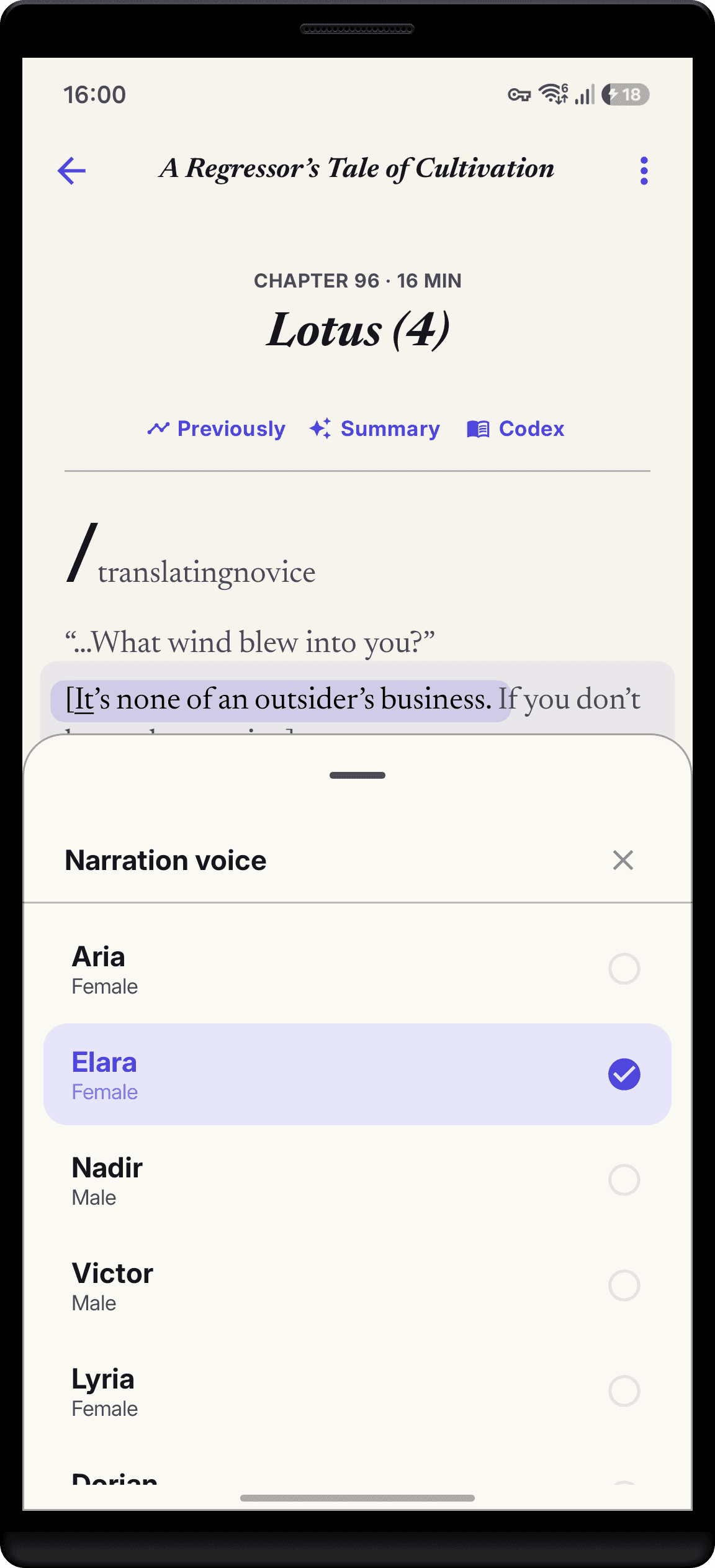
Open the voice picker, preview the bundled samples, and download one engine pack (roughly 79 to 141 MB over Wi-Fi). One download unlocks all of that engine's voices, and deleting it later frees the space without touching your library.
- 3
3. Press play and tune it
Set speed between 0.75x and 2.0x, pick a sleep timer if you listen in bed, and let sentence highlighting keep the text in sync. The neural voice guide covers every player control.
What neural voices still won't do
Honesty matters here, because marketing tends to overpromise. Neural voices do not perform characters. There is one narrator, not a cast, so a gruff warrior and a child get the same instrument even if the phrasing shifts. Invented names get the nearest English pronunciation of their spelling, which is consistent but sometimes wrong. And very occasionally the model will flatten a line that a human narrator would lean on, reading a dramatic reveal with the same even tone as the paragraph before it. For serial fiction that will never get a professional audiobook, the trade is still overwhelming: unlistenable becomes genuinely enjoyable. Just do not expect a performance.
Worth knowing: StoryCodex still offers your phone's built-in system voice as a no-download fallback. That is intentional. The system voice is fine for a thirty-second preview or a pasted news snippet, and it works the instant you install the app. But for anything longer than a few pages, the difference a neural engine makes is not subtle, and the one-time download is the entire cost of the upgrade.
The clearest way to hear the difference is an A/B test on text you know well. Open a favorite chapter, let the system voice read two paragraphs, then switch to a neural voice and replay the same lines. Listen for three things: where the voice breathes, whether dialogue tags soften after spoken lines, and how long you can listen before the voice itself becomes tiring. Most people notice all three inside a minute.
Who the upgrade matters most for
Natural narration is a convenience for most readers and an accessibility feature for some. If you read with low vision, dyslexia, or attention difficulties, the difference between a voice you have to decode and a voice that simply reads is the difference between abandoning audio and using it daily. Sentence highlighting gives your eyes a target while the voice carries the pacing, speed presets let you slow dense passages to 0.75x or skim familiar ones at 2.0x, and because synthesis happens on the device, a screen-reader-adjacent workflow works in airplane mode with nothing leaving the phone. Second-language readers get a bonus too: following highlighted text while a clean voice narrates is one of the better ways to build vocabulary in context.
Neural voice myths, checked
Human-sounding TTS requires a cloud subscription like ElevenLabs
StoryCodex runs open neural models (Kokoro, Piper, Supertonic) locally on your device with zero subscription fees and no account.
Neural voices eat huge amounts of phone storage
A complete engine pack runs about 79 MB (Piper), 141 MB (Kokoro), or 123 MB (Supertonic), roughly the size of a short video, and covers every voice in that engine.
Neural voices need a flagship phone or a GPU
The packs are int8-quantized for ordinary phone CPUs, and the app picks a backend automatically: neural acceleration where the device offers it, optimized or plain CPU otherwise.
You lose your place when switching voices
Position is tracked per sentence. Swap engines or voices mid-chapter and narration continues from the same word.
Listening while following the highlighted text improves both comprehension and reading speed, which makes neural narration a strong tool for second-language learners and speed readers alike.
StoryCodex is free to try on Google Play and the App Store. Import a serial, pick a neural voice, and your library works fully offline, no account required.
Keep the story clear
Try StoryCodex for free.
Read, listen, and remember any long story with a private, spoiler-safe story memory that lives on your device.

