 StoryCodex
Story Codex Explained: Characters & Timeline
A tour of the per-book encyclopedia StoryCodex builds as you read: characters, world, timeline, inline lore marks, and the spoiler gate.
 ForgeAppsUpdated September 29, 20268 min read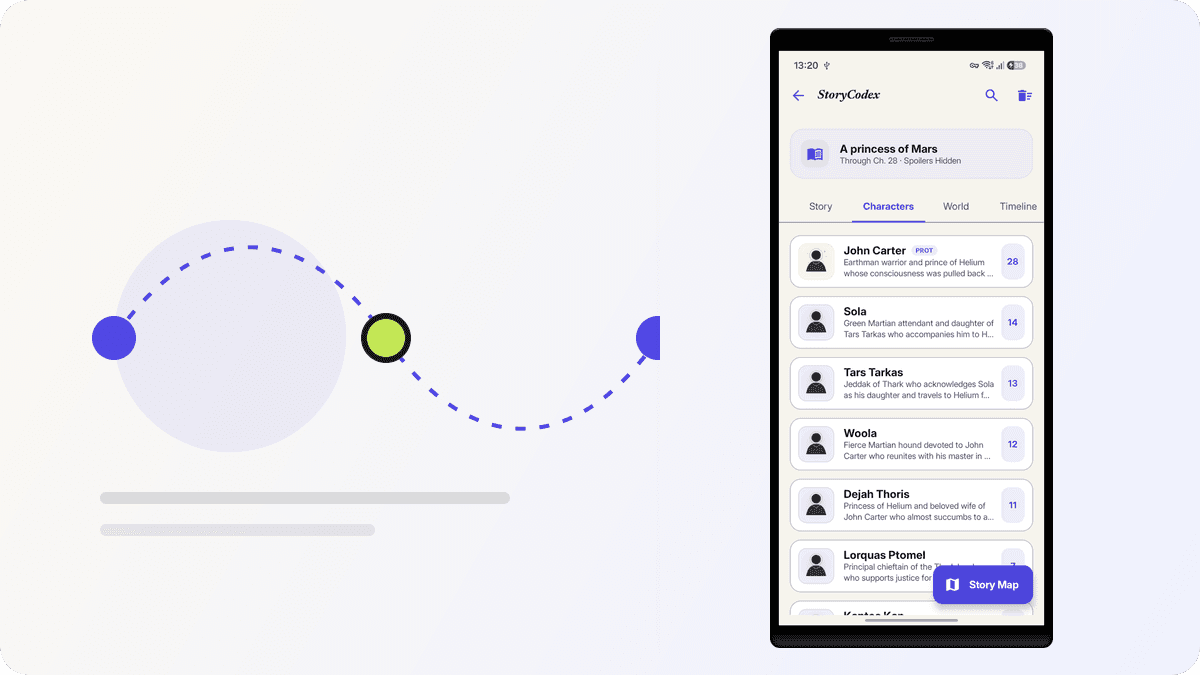
The Story Codex is the heart of StoryCodex. Open it from any book, or tap the Codex button in the reader's AI bar, and you land on four tabs: Story, Characters, World, and Timeline. Everything in them is generated from the chapters the companion has analyzed, and everything is bounded by your reading position. There is no hand-editing and no import step. You read, and the Codex fills in behind you.
The four tabs
Story
The book broken into arcs. Each arc card carries a title, a chapter range badge like 41-96, and a short prose summary of that phase of the narrative. This is the data the Previously On recap draws on.
Characters
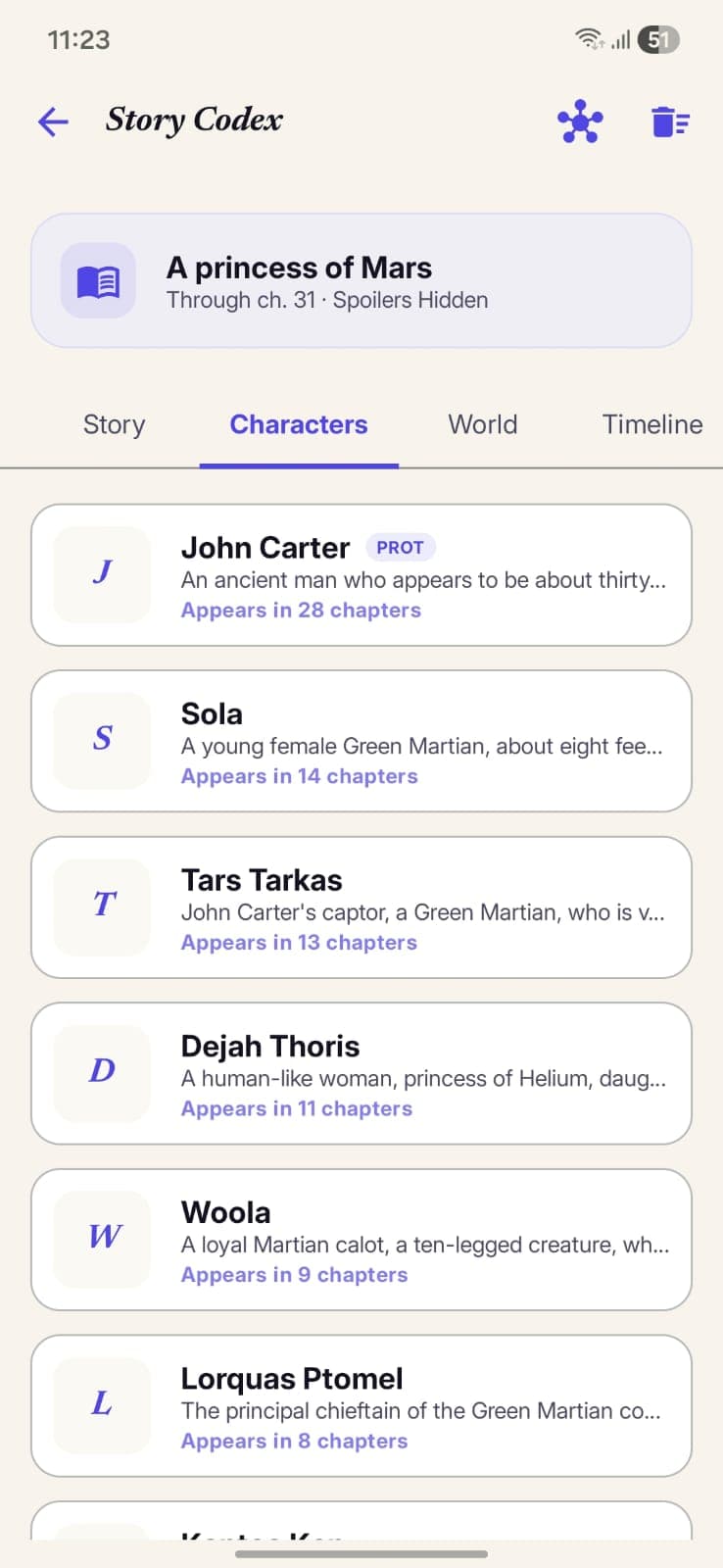
Every person extraction has confirmed, as cards with a portrait, a two-line description, and an appearance count. The protagonist carries a small PROT badge. Tap a card for the full dossier.
World
Everything that is not a person, grouped into collapsible sections: Places, Factions, Items, Concepts, and Mysteries. Each section previews a handful of entries and expands on demand.
Timeline
Dated milestones with chapter references: arrivals in new locations, power-ups, character entrances and exits, relationship changes, world events, and reveals, each tied to the chapter where it happened.
Anatomy of a character profile
Say you are reading a cultivation serial where the lead is introduced as Jun Saru, a debt-ridden caravan guard who later picks up the alias the Ashen Blade. Tap his name and the profile opens with a header band: his canonical name, his role as subtitle, and his aliases as chips underneath. Below that is a one-paragraph summary that rewrites itself as the story develops, then a KPI row with three cards: First seen (the chapter he debuted, with a note about the scene), Last active (the most recent chapter he appeared in), and Connections (how many other entities link to him).
Under the KPIs sits an attribute grid that changes with the entity type. For Jun it might show Kind, Role, Occupation, Power Tier, Goal, Age, and Evolution, so a realm breakthrough in chapter 214 actually shows up as a changed field rather than buried trivia. Fields that came back as unknown or n/a are simply hidden instead of padding the card. Scroll further and you reach the Character progression section: a per-chapter trail of deltas, each stamped with a chapter label and often a quote, so you can watch him go from caravan guard to sect disciple to blade-for-hire in order. At the bottom, connections list everyone he is linked to, and each one is tappable, so Jun leads to the Ninth Bell sect, which leads to its leader, and so on.
Other types carry their own fields. A place profile shows Kind, Realm, and Accessibility, plus its parent location, its ruling faction, and who is currently there. A faction shows Kind, Alignment toward you (ally, neutral, enemy), and Goal, along with its leader, parent faction, and headquarters. Items get Kind and Tier, concepts get the System they belong to, and mysteries get a Status that moves through open, foreshadowed, partially revealed, and resolved, recording the chapter where the answer finally landed.
Codex marks: lore inline, not in a sidebar
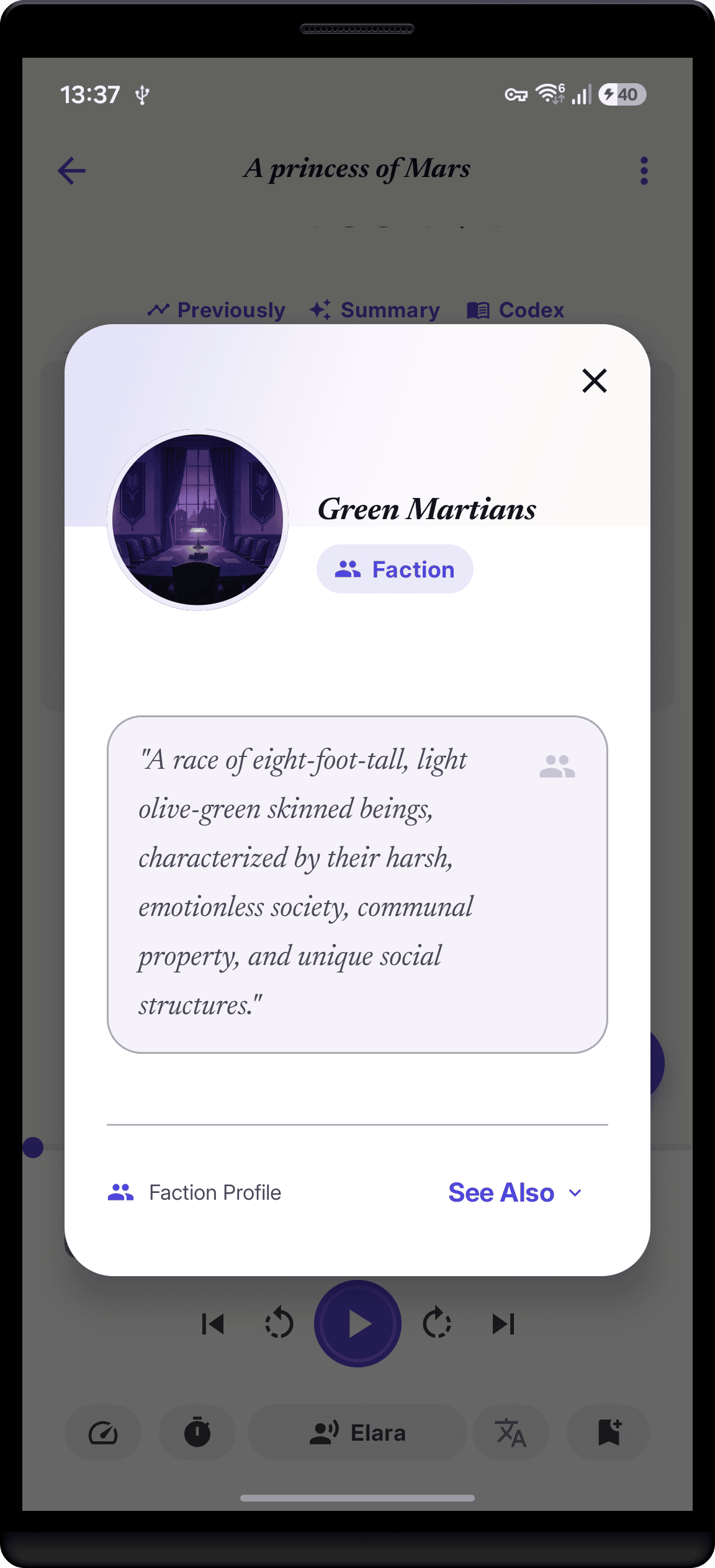
While reading, StoryCodex highlights recognized entities right in the text: characters, places, factions, items, and concepts. Tap one and a compact lookup card slides up over the page. The card leads with Recent developments, a list of chapter-stamped notes about that entity with a This chapter badge when the note comes from the page you are on. Below that, In this chapter shows who the entity shared the scene with, Other connections expands to the full web, and a Related history block surfaces facts about them that were stored under other entities' names. When the card is not enough, the Full Profile button jumps straight to the dossier.
If the highlights ever feel noisy, the eye icon in the reader's top bar toggles them off and back on with one tap. The detection itself combines the companion model with Android's built-in text classifier for person names and a phrase catalog tuned for fiction, and the marks resolve against the entities your Codex already knows rather than guessing at strangers.
How extraction works while you read
Analysis triggers automatically a few seconds after you open a chapter, once the app is sure you are actually reading rather than skimming past. From there a pipeline runs in stages: the chapter recap first, then character extraction, then appearances and location visits, then relationships, then world entities and timeline milestones, and finally a consolidation and deduplication pass. Each stage checkpoints separately, so if you close the app or the phone kills the process mid-chapter, the run resumes from the last finished stage instead of starting over.
Two design details are worth knowing. On-device models are real work for a phone, so the pipeline deliberately pauses between stages when the device reports it is warm or the battery is low, which you can tune or disable with the Battery & Heat Safety toggle in companion settings. And extraction is probabilistic: a background extra can occasionally be promoted, or a minor place can be missed. The Codex is a very good memory, not a perfect wiki.
Two names, one person
Web novels love aliases. A character might be the Pale Warden for eighty chapters before anyone calls her Ilka Sorrel. The Codex handles this in two passes. First, an embedding similarity pass runs in the background and nominates pairs of entries that look like they might be the same entity. Then a separate adjudication pass asks the active model to judge each nominated pair, a few per chapter at most, and records a verdict of same or distinct. Only confirmed pairs merge, and the merge keeps the earlier first-seen name as canonical while folding every alias, appearance, and relationship into one profile. If you see the Pale Warden and Ilka Sorrel as separate cards, give it a few chapters: the backlog drains as you read.
Skipped chapters and partial coverage
The Codex only knows about chapters that were actually analyzed. If you jump from chapter 40 to chapter 60, the gap is not filled with guesses: those entries simply do not exist, and recaps and the timeline stay honest about it. A companion setting called Summarize Chapters in Order goes further and refuses to analyze a chapter whose predecessor has not been summarized yet, because an out-of-order summary can scramble character introductions and plot logic. If you want to close a gap without rereading, the book page's bulk Analyze action can process the backlog, though batch runs require a cloud model as covered in the chapter summaries guide.
Spoiler-gated by design
The Codex only reflects what you have already read. Every entity, delta, arc, and timeline event is stamped with the chapter ordinals it came from, and the reader caps everything at your position. Arc prose is versioned, so even if the current arc's summary already mentions the chapter you are sitting on, views that look backward resolve the snapshot as of the earlier chapter. Character profiles never reference unread chapters, the timeline stops at your position, and recent developments always means recent in your reading, not in the story. The same rule applies to the Story Map and to story insights, which is what makes tracking a long web novel without spoilers practical in the first place.
One more detail for series readers: linked volumes share a single Codex namespace, so finishing volume one and opening volume two keeps every character, place, and thread you already met. Our multi-volume series guide explains how linking works.
Codex glossary: the words you will see
- Story Codex
- The per book (or per linked series) encyclopedia of everything you have read so far.
- Codex mark
- An inline highlight on a recognized entity in the reader. Tap it for a lore lookup card.
- Entity profile
- A full page for a character, place, faction, item, concept, or mystery, with a KPI row and type-specific attributes.
- Chapter delta
- A per-chapter note recording what changed for an entity in that chapter. Deltas power the First seen and Last active KPIs and the progression trail.
- Extraction
- The pipeline that turns finished chapters into Codex entries. Runs on device by default.
- Alias resolution
- The two-pass check that detects when two names are the same entity and merges their entries.
- Spoiler gate
- The rule that bounds every Codex entry to your reading position, enforced structurally by chapter ordinals.
StoryCodex is free to try on Google Play and the App Store. Import a serial, pick a neural voice, and your library works fully offline, no account required.
Keep the story clear
Try StoryCodex for free.
Read, listen, and remember any long story with a private, spoiler-safe story memory that lives on your device.

